1. NAVIGATION DESIGN
The goal of the navigation design provide different ways of accessing the large amount of information that the Art Center website provides. For those who are searching for specific information, we want to provide navigation that enables users to drill down effortlessly to the desired information. For those who are new to the college, we want to provide an interactive experience that takes the users on a tour of the school, the people and the work.
Our navigation design will consist of a horizontal main navigation above the fold. The secondary navigation for each section will be accessible via rollover from the main navigation, allowing users to delve into the secondary layer of information to quickly access the desired page. There will be no overview pages per main navigation channel, so if a user clicks on the main navigation item, they will land on the first item in the secondary navigation within that channel. The third level of navigation will be placed on the left side of the page, and will be able to open up into a fourth level if necessary.
The main navigation channels have been reduced to stay within the recommended 7 (+-) 2 rule to improve scannability. Complex hierarchies have been reduced, and information will be cross-referenced within each section taking advantage of relationships between content.
2. Discussion of tools & technologies to be used
Programs:
Graphic: Macromedia Flash, Adobe Photoshop, Adobe Illustrator,
Site Building: Macromedia Dreamweaver, BBedit
Sound: Sound Studio, Macromedia Flash Supported Platforms:
We recommend supporting both PC and Macs, keeping in mind that a large portion of our audience uses Macs as their primary platform due to its penetration into art related professions.
Supported Browsers:
We recommend developing an approach to browsers where we support and certify a short list of current browsers. This list includes:
- Internet Explore 6.0 on PC (including AOL)
- Netscape 7.0 on PC and Mac
- Safari 1.1 and up on a Mac
On the second level we would develop a list of supported browsers that represent a significant level of usage, but are old, show a trend of fading usage, or no longer supported by their manufactures and do not warrant a significant cost for support. This would include:
- I.E. 5.5 on PC and AOL
- I.E. 5.0 on PC
- I.E. 5.2 on Mac
Technologies:
Basic Technologies: HTML, Flash, CSS, JavaScript, Flash 5 Player Required
We will construct the site as a combination of Flash and HTML. The navigation will be built using Flash to improve the navigation experience and enable us to animate the secondary navigation and main branding areas. There will not be an HTML version as the current penetration rates of Flash 5 across US, Canada, Asia and Europe average 97.5%. Each individual page will be HTML to allow for the easy updating of content.
Backend Technologies: We recommend using a backend technology that is compatible with existing database and content management systems.
3. Special Technical Challenges
Special challenges will be to effectively pass information and variables between the flash navigation and HTML pages.
4. Page Size Targets
Art Center website will be built to optimize download speed for a large and varied and audience.
Page Dimensions: Pages will be designed with critical information viewable above the fold for the 800x600 screen resolution. The screen resolution of 1024 x 768 will be used as a guideline for other design decisions as this includes ~63% of current users online today.
Page Size: Page Size should be kept to 40-60K per page, with an exception made for the homepage if necessary, which should be under 100K.
5. File Naming Convention
Title Tag:
Page titles should include the name of the school and then the secondary navigation name: "Site Name: Secondary Navigation Item”. (ex. Art Center College of Design: Transportation Design)
Files/Folder Naming Rules:
- No spaces in file names, all lowercase letters, and no special characters except for underscores.
- All files must include extensions. (ex. Index.html)
- When numbering files use 001, 002 as numbering convention. (magazine_004.gif)
- Files are to be named according to the section/page name so that the name reflects the information design. (ex. Trans_design.html, history.html)
- Images are to be named according to their function. (ex. submit_button.gif, trans_design_top.gif, sally_profile.jpg)
- Sound Files: Sound files will be named of numbers an underscore and a description of 01, 02, 03, etc.
(ex. The name of the first sound on the home page will be named sound_01)
Cascading Style Sheets Naming Rules:
CSS names will be named according to their function: (i.e. Header, subheader, text title etc…) so that the color, and fonts may change over time, but the CSS name will still have meaning as to the use on the page. (ex. "Header_large" means this is the style used for the large headers across the site. Additionally, navigation CSS treatments will not be used for text body elements and vice versa, to maintain separation of content and navigation.)
6. Site Directory Structure
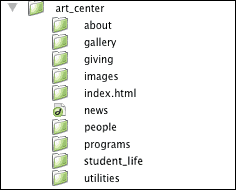
On the server, the top level of the Site Directory contains the Homepage (index.html), image directory, and subdirectories for the second level pages on the site. Second level directories named after the menu items will contain an index.html and image directory to allow for easy deletion and alteration of possible sliced images. The main image directory on the top level will contain global images such as application buttons and navigation images.
7. Site Revision Conventions
We will create a brand new website file structure with the above specifications. All designs and prototypes must be approved before we begin building the website. All team members will use Dreamweaver to build and manage work through a check-in, check-out system.
Content Updates:
The client will be responsible for updating content via a content management system. The client can contract Tim Too Design to revise and modify graphics and additional items if necessary.
|